How to check your AI visibility yourself, step by step
A hands-on guide to checking whether ChatGPT, Claude, Gemini and Google's AI Overviews recommend your business: what to ask, how to record what you see, and how to read the results.
Pick a question your best customer might ask before they ever hear of you. Not your company name. The problem they have.
"We're a 40-person agency and our project tracking lives in spreadsheets. What's a good tool for us, and what should we expect to pay?"
"My back tooth hurts when I drink something cold. Is there a dentist in Calgary who can see me this week?"
"I'm buying my first house in Charlotte. Do I actually need a real estate lawyer, and who's good?"
Now type it into ChatGPT. Read the answer. Is your business in it?
That one question is the start of an AI visibility check. This guide turns it into a proper one: a short list of questions that covers how your buyers actually decide, asked across the AI assistants they use, recorded in a way that tells you something. It works for any kind of business, from software to dental clinics to roofing companies, and it needs nothing more than a browser and a spreadsheet.
It takes a few hours the first time. You'll come out of it knowing where AI recommends you, where it recommends someone else, which sources it leans on, and whether it gets your basic facts right.
Why check at all
When a buyer asks a search engine a question, they get a list of links and do the comparing themselves. When they ask an AI assistant, the assistant does the comparing for them and hands back a short answer, usually with a handful of names in it.
That changes what "being found" means. You aren't competing for a spot on page one. You're competing to be one of the few names in the answer, and ideally the first one. If you aren't named, the buyer may never know you exist, and nothing in your web analytics will tell you that you lost them.
The only way to know where you stand is to ask the questions your buyers ask and look at the answers.
Before you start: set up a fair test
AI answers change with who's asking, where they are and what they've said before. A few minutes of setup keeps you from fooling yourself.
- Log out, or use a private window. Assistants that remember you, or that know you work at your company, can give you a friendlier answer than a stranger would get. Where you can't log out, turn off memory and personalization for the session.
- Start a new chat for every question. Earlier messages in a chat steer later answers. One question, one fresh conversation.
- Make sure web search is on. Most assistants can answer from what they learned in training or by searching the web live. Buyers usually get the live version for questions about providers, prices and locations, so test that one. In ChatGPT and Claude, check that search is turned on.
- Set the location you care about. If you serve particular cities, put the city in the question ("in Denver") rather than relying on the assistant to guess where you are. If you sell nationally, say "in the US" or "in Canada" when it matters.
- Ask each important question more than once. The same question can produce different names on different days. Two or three runs of your most important questions tell you whether a result is a pattern or a coin toss.
Step 1: Write down the basics
Before you write a single question, put four things at the top of your spreadsheet. Every question you write will come from them.
- What you sell, in the words a buyer would use. Not your tagline. "Project management software for agencies." "Emergency plumbing." "Family dentistry." "Estate planning for business owners."
- Who buys it. Your two or three main buyer types, with the situation that sends them looking. "Agency owner whose team has outgrown spreadsheets." "Homeowner with a leak at 9pm." "Parent looking for a pediatric dentist after a move."
- Where you sell. The cities or regions you serve, or "US and Canada" if location doesn't matter.
- Who you lose to. The three competitors you see most often in deals, quotes or reviews. AI may name others, and that's useful to know too.
Step 2: Build your question list
Most businesses make the same mistake on their first check: they ask the assistant about themselves. "What is Acme Software?" "Is Smith Family Dental good?" Those questions matter, but a buyer who already knows your name is halfway to choosing you. The questions that decide whether you get considered at all are the ones asked before the buyer knows you exist.
Cover the buyer's whole journey. Five kinds of question do that.
1. The problem
The buyer knows they have a problem but not what the solution is called, or who provides it.
- "Our team keeps missing deadlines because nobody knows who owns what. How do other agencies fix this?"
- "There's a brown stain spreading on my ceiling after the rain. What could it be and who do I call?"
- "My small business got a letter from the state about unpaid payroll taxes. What should I do?"
These answers often don't name any companies. When they do, the names that appear are the ones AI treats as experts in the problem, which is a strong place to be.
2. The shortlist
The buyer knows what they want and is looking for who to pick.
- "What are the best project management tools for creative agencies?"
- "Best emergency plumber in Tampa that's open on weekends"
- "Who are the top family law firms in Vancouver?"
- "Where can I buy wide-width hiking boots online with free returns?"
This is the most important group. Write several versions for each buyer type and each city or segment you care about, because "best CRM for a 10-person startup" and "best CRM for a manufacturing company" can produce completely different lists.
3. The comparison
The buyer has names in mind and is weighing them.
- "[Competitor] vs [your company] for a 20-person agency"
- "What are the alternatives to [competitor]?"
- "Is [competitor] or [your company] better for someone with dental anxiety?"
Use your real competitors from Step 1. "Alternatives to [competitor]" questions are worth extra attention: they're how buyers who are unhappy with a competitor go looking for someone new.
4. Trust
The buyer is close to a decision and wants to know if you're safe to choose.
- "Is [your company] legit?"
- "What do customers say about [your company]?"
- "Has [your company] had any complaints or lawsuits?"
- "Is [your company] good for small businesses, or mostly for enterprises?"
Here you're not checking whether you appear, since you're named in the question. You're checking what AI says about you, and whether it sounds like a recommendation, a shrug or a warning.
5. The facts
The buyer wants specifics before they call or sign up.
- "How much does [your company] cost?"
- "Does [your company] take [insurance plan]?"
- "What are [your company]'s hours on Sunday?"
- "Does [your company] integrate with QuickBooks?"
These are where AI most often gets things wrong, by quoting an old price, a closed location or a service you stopped offering. Pick the facts that would cost you a customer if they were wrong.
How many questions?
Enough to cover each kind of question for each buyer type and location you care about, and few enough that you'll actually finish. For most businesses that's somewhere between 20 and 40. Weight the list toward shortlist and comparison questions, since those are closest to a buying decision.
Step 3: Ask every question on every assistant
Your buyers don't all use the same assistant, so check the ones they're most likely to use. For most businesses in the US and Canada that means:
- ChatGPT at chatgpt.com, with search turned on.
- Claude at claude.ai, with web search turned on.
- Gemini at gemini.google.com.
- Google's AI Overviews, the AI-written summary that appears above the regular results for many Google searches. Search the question on google.com in a private window. AI Overviews don't appear for every search, so record "no overview" when one doesn't show up. That's a result too.
Copy each question in exactly as written. Changing the wording between assistants makes the results hard to compare.
Paste the full answer into your spreadsheet, or take a screenshot. You'll want to reread answers later, and you can't count on getting the same one twice.
Step 4: Record what you see
For every answer, fill in one row. These columns are enough:
| Column | What to write |
|---|---|
| Question | The exact question you asked |
| Kind | Problem, shortlist, comparison, trust or facts |
| Assistant | ChatGPT, Claude, Gemini or AI Overviews |
| Result | Cited, mentioned, competitor only, or absent |
| Position | If you're named, were you first, second, third or later? |
| Others named | Every other company in the answer |
| Sources | The websites the answer linked to or quoted |
| Wrong facts | Anything it said about you that isn't true |
| Tone | For trust questions: positive, neutral or negative, and why |
The four results mean:
- Cited: you're named and the answer links to your website as a source. This is the strongest result.
- Mentioned: you're named, but the answer doesn't link to you.
- Competitor only: you aren't named, but at least one competitor is.
- Absent: neither you nor anyone you compete with is named.
"Competitor only" and "absent" look similar but mean different things. Competitor only means the spot exists and someone else has it. Absent usually means AI doesn't connect this question to businesses like yours at all, or answers it without naming anyone.
Step 5: Read the results
With your rows filled in, a few simple counts tell you most of what you need to know.
How often you're named
Count the shortlist, comparison and problem answers where you were cited or mentioned, and divide by the number of those answers. That's your mention rate. Leave out the trust and facts questions, because they name you in the question.
Then look at the same number for each assistant on its own. It's common to show up well in one and barely at all in another, because each one leans on different sources.
How often you're named first
Of the answers that name you, how many name you first? Being in the answer is good. Being the first name is what gets the click or the call.
Who wins when you don't
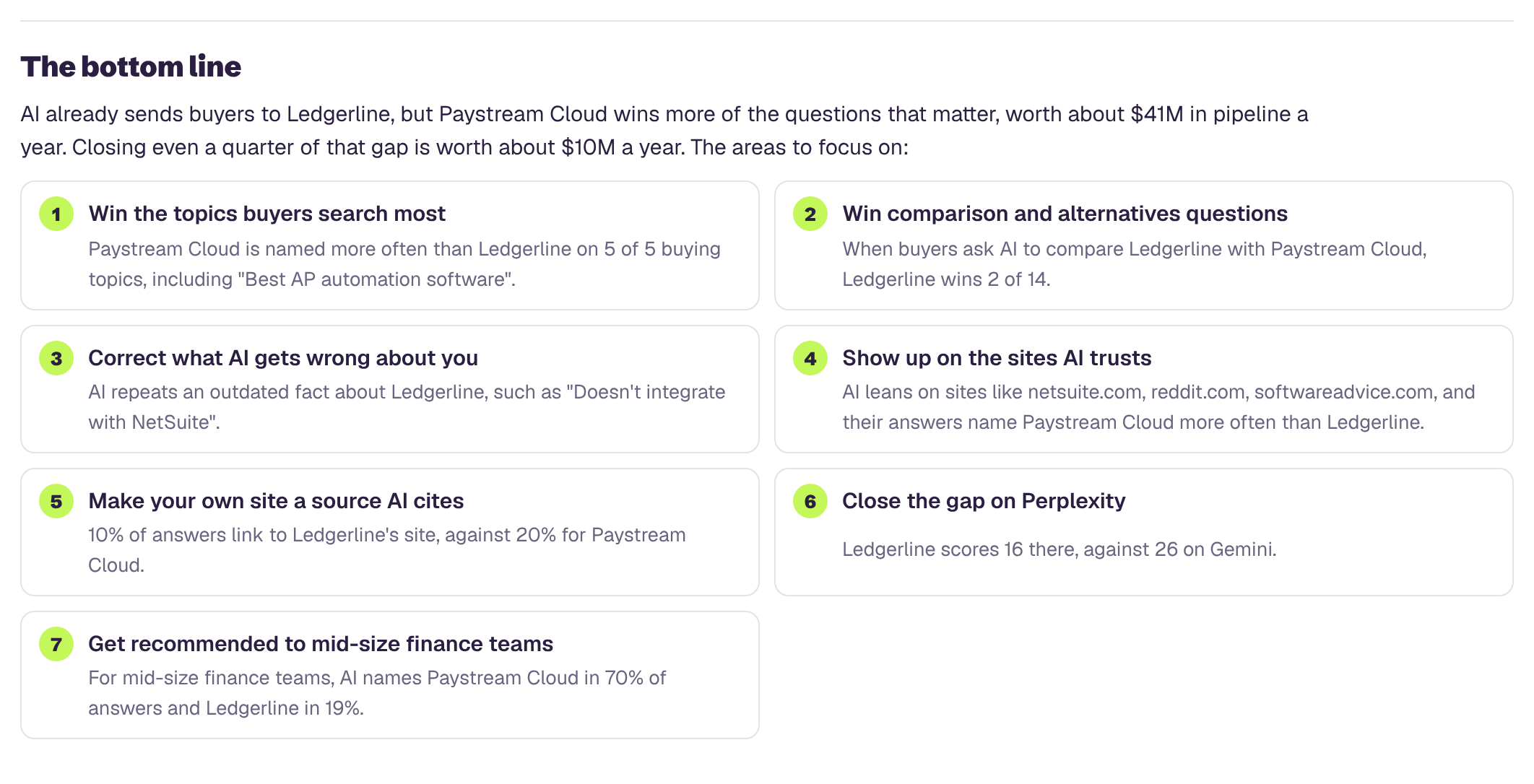
Go through the "others named" column and count how often each company appears. The name at the top of that list is the business AI treats as the default in your category, and it may not be the competitor you worry about most. Look at a few of their answers. What does AI say about them that it doesn't say about you?
Where the answers come from
Count the domains in your sources column. Most businesses find that a handful of sites show up again and again: a review site, a directory, a forum, an industry publication, a comparison article. Those are the places AI is reading to decide who to recommend. Note which ones mention you and which don't.
What AI gets wrong
List every wrong fact, with the assistant that said it. A wrong price or a closed location in one assistant is a problem. The same wrong fact in all of them usually means it's coming from one source they all read, which makes it easier to find and fix.
How you sound
Read your trust answers side by side. Does AI describe you the way you'd want a customer to hear it? Is there a complaint, an old controversy or a limitation that keeps coming up? Is it vague, as if it doesn't know much about you?
Step 6: Decide what to do about it
What you do next depends on what you found. A few patterns come up again and again.
- AI gets facts wrong. Find where the wrong fact lives. It's often an old directory listing, an outdated page on your own site or a third-party profile you forgot about. Fix it at the source, then make sure your own website states the correct fact plainly, in words a buyer would search for.
- You're missing from shortlists but competitors aren't. Compare what the winners have that you don't. Usually it's a clearer description of who they serve, more pages that answer the exact questions buyers ask, and more mentions on the sites AI cites.
- One source keeps coming up. If the same review site, directory or comparison article appears in answer after answer, being on it, with accurate details and recent reviews, matters more than almost anything else you could do this month.
- You're named but described vaguely. AI can only repeat what it can find. Specific, public detail about who you help, what you do differently and what customers say tends to make answers more specific too.
- You're strong in one assistant and weak in another. Look at the sources each one cites. The gap is often a site one assistant reads that the other doesn't.
You won't fix everything at once, and you don't need to. Start with the wrong facts, because they actively cost you customers, then work on the shortlist questions closest to a buying decision.
Mistakes that make a check misleading
- Only asking about yourself. Questions with your name in them tell you what AI says once a buyer has found you. They don't tell you whether buyers find you.
- Testing while logged in. A personalized answer can make you look more visible than you are.
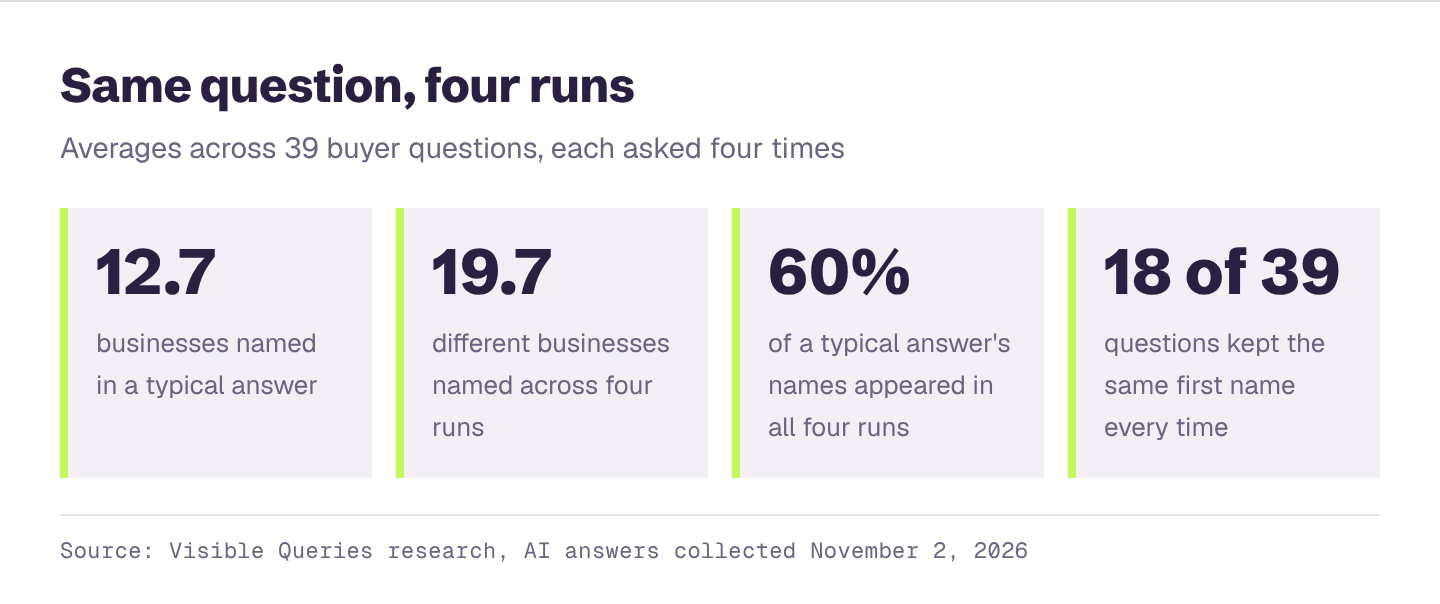
- Asking once and calling it done. Answers vary. One good result on one day isn't a pattern.
- Asking leading questions. "Is Acme the best agency tool?" invites a yes. Ask the way a buyer who has never heard of you would.
- Changing the wording between assistants. Small changes in wording can change the names in the answer. Keep each question identical everywhere you ask it.
- Ignoring the sources. The sources are the most useful part of the answer. They tell you what to do next.
How often to check
Answers shift as assistants update and as new content appears about you and your competitors. Rerunning your list every month or two is enough to spot a real change. Keep every run in the same spreadsheet, with the date, so you can compare.
If you make a change, like fixing a listing or publishing a new page, give it a few weeks before you check again. It takes time for new information to show up in answers.
The manual way, and the fast way
Everything in this guide works, and doing it by hand at least once is worth it. You'll read what AI actually tells your buyers, in its own words, and that's hard to forget.
It is also slow. A solid check means writing questions for every buyer type and location, asking each one on every assistant, more than once, and recording every name and source. Then doing it again next month.

Visible Queries runs the whole check for you. Enter your website and it works out what you sell, who you sell to and who you compete with, writes the questions your buyers ask, asks them across AI platforms and turns the answers into the numbers in this guide: how often you're named, how often you're first, who AI recommends instead of you, and what it gets wrong. It's free, and it takes a few minutes instead of an afternoon.
Skip the spreadsheet: get your AI visibility score
Enter your website and get a free AI visibility report. It takes a few minutes, and you'll see:
- Your AI visibility score, overall and for ChatGPT, Gemini, Claude, Perplexity and Google's AI Overviews and AI Mode
- Who AI recommends instead of you, and how often
- Which topics you win and lose, and how often each one is searched
- What AI gets wrong about you, and what to fix first
- A downloadable PDF you can share with your team