AI search optimization: a step-by-step guide for small and mid-sized businesses
A practical AI search optimization plan for businesses without a big marketing team: what to do in the first week, the first month and the first quarter to get named by ChatGPT, Gemini, Claude, Perplexity and Google's AI.
AI search optimization is everything that helps your business get named when people ask AI tools who to hire or what to buy. It goes by several names, GEO, AEO and LLM SEO among them, but the work is the same.
This guide is for businesses without a big marketing team. It lays out what to do in your first week, first month and first quarter, in the order that usually pays off fastest.
The short version
- Week 1: fix access and get a baseline. Make sure AI can read your site, and measure where you stand on the questions buyers actually ask.
- Month 1: fix your own pages and listings. Clear answers, specific facts, consistent details everywhere.
- Quarter 1: get onto the sources AI reads. Lists, reviews, directories and press. This is the biggest lever and the slowest.
- Then re-check monthly. AI answers change, so watch the trend.
If you only do one thing today, check your AI visibility score for free. Everything else in this guide is easier once you know your gaps.
Week 1: access and a baseline
Check that AI can read your site
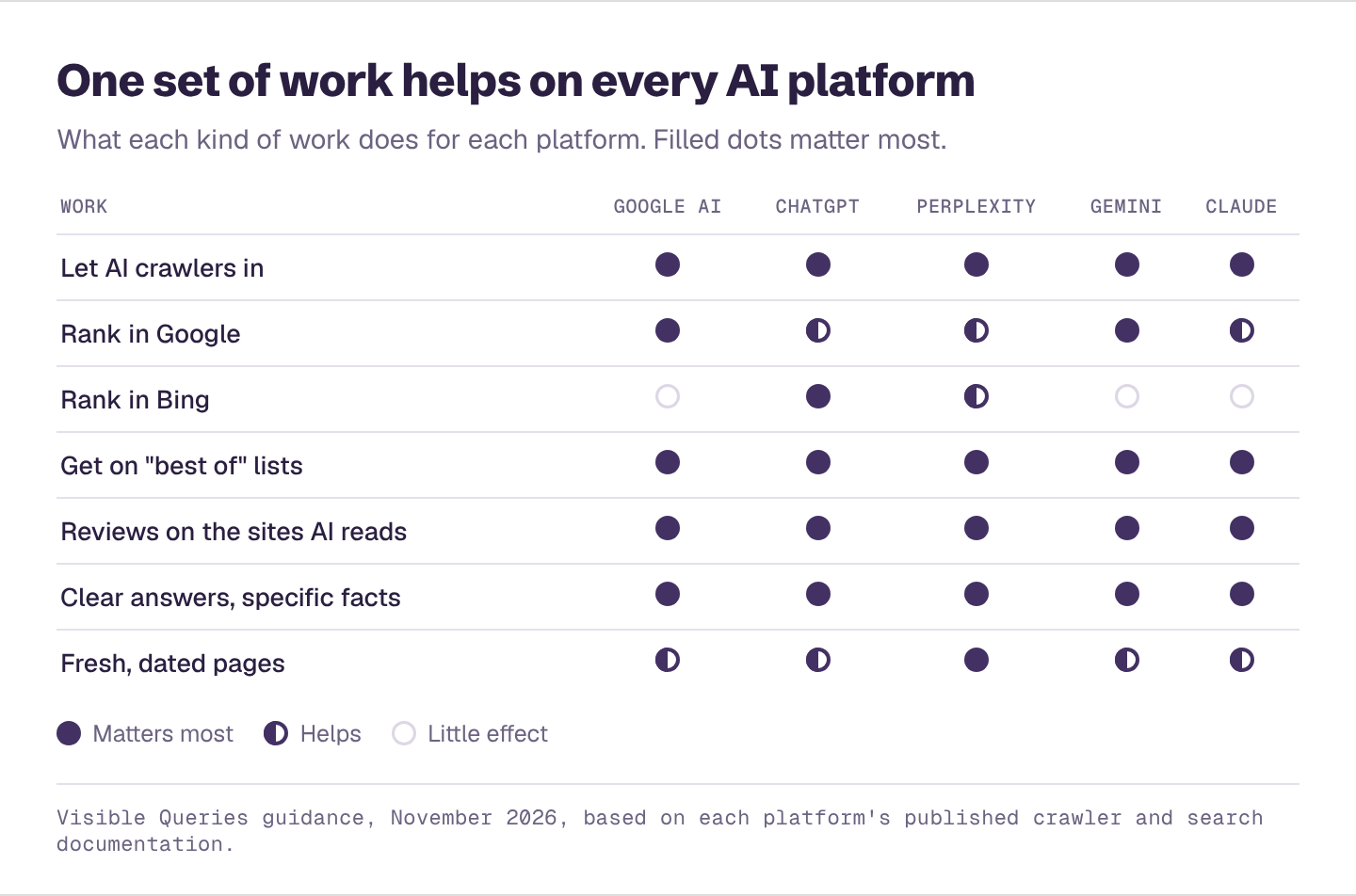
Open yoursite.com/robots.txt. Make sure none of these are blocked: Googlebot, Bingbot, OAI-SearchBot (ChatGPT search), PerplexityBot, Claude-SearchBot. If you use a website builder or CDN with a "block AI bots" setting, check what it blocks. Blocking training bots like GPTBot is a separate choice and won't remove you from AI search.
Set up Bing Webmaster Tools
ChatGPT's search draws on Bing as one of its sources. Verify your site at Bing Webmaster Tools (you can import from Google Search Console) and submit your sitemap. It takes about 15 minutes.
Measure where you stand
Ask AI the questions your buyers ask, without your business name in them, on several platforms. Record who's named. Our guide on checking your AI visibility yourself shows how, or run the free AI visibility checker to get a score, your competitors and your biggest gaps from your website address.
Month 1: your own pages and listings
Rewrite your most important pages
For your homepage and your top three service or product pages:
- Say plainly what you do, for whom and where in the first two sentences.
- Add specifics: price ranges or starting prices, service areas, hours, turnaround times, certifications.
- Answer the top buyer questions under clear headings, with the answer first.
- Add an FAQ.
- Put a visible "updated" date on pages with prices or facts that change.
In our study of what AI-cited websites have in common, most cited homepages showed reviews (90%), had structured data (81%), showed a phone number (79%) and showed prices or linked to pricing (63%).
Add pages for each city and service
If you serve several places or offer several services, give each its own page. Location and city pages were 21% of the business pages AI cited in our research. Cost guides with the city name in the address were especially popular for price questions.
Make your details consistent everywhere
Your name, address, phone, hours, services and prices should match on your site, your Google Business Profile, and every directory. When AI gets facts wrong, an outdated listing is often why. In our check of 745 claims about 41 businesses, 11 had at least one plainly wrong fact.
Quarter 1: the sources AI reads
This is where most of the gain is. About three quarters of the sources AI cited in our research were written by someone other than the business.
Find your target list
For your ten most important buyer questions, look at what AI cites. You'll see the same list articles, review sites and directories again and again. Put them in a spreadsheet.
Work through it
- "Best of" lists: contact the authors, offer something useful (a quote, data, a customer story) and ask to be considered.
- Review sites: ask happy customers for reviews on the ones AI cites for your industry. See which review sites AI trusts.
- Directories and associations: complete every profile.
- Local and trade press: pitch stories, data and expert comment.
Our guide to getting onto the sources AI cites goes through outreach step by step.
What to skip
- Don't buy "AI optimization" plugins that promise rankings. There's no hidden tag. Google says there are "no additional requirements to appear in AI Overviews or AI Mode."
- Don't publish dozens of thin AI-written articles. They rarely get cited and can hurt trust.
- Don't measure only by asking about your own name. AI will almost always know you; that tells you nothing about recommendations.
How to know it's working
Re-check monthly and watch:
- Mention rate on unbranded buyer questions, per platform
- Share of voice against your top competitors
- Accuracy of what AI says about you
- AI referral visits in analytics. See how to track AI traffic in GA4.
- Branded searches and direct visits, which often rise as AI mentions you more
For platform-specific steps, see our guides to ChatGPT, Google AI Overviews, Perplexity, Gemini and Claude.
Find your first AI search fixes
Enter your website and get a free AI visibility report. It takes a few minutes, and you'll see:
- Your AI visibility score, overall and for ChatGPT, Gemini, Claude, Perplexity and Google's AI Overviews and AI Mode
- Who AI recommends instead of you, and how often
- Which topics you win and lose, and how often each one is searched
- What AI gets wrong about you, and what to fix first
- A downloadable PDF you can share with your team