How to rank in Google AI Overviews and AI Mode
What Google says it takes to appear in AI Overviews and AI Mode, why ranking and being named aren't the same, and the steps that get your business into Google's AI answers.
"Best accounting software for a small construction company"
Type that into Google and, before the first blue link, there's often an AI Overview: a few paragraphs that name three or four products and link to the pages they came from. Switch to AI Mode and the whole page becomes a conversation, with links off to the side.
For many searches, that summary is now what a buyer reads first. This guide covers what Google says about getting into it, what our data shows, and the practical steps. For every other platform, see our guide to getting recommended by AI.
The short version
- There's no special trick. Google says there are "no additional requirements to appear in AI Overviews or AI Mode, nor other special optimizations necessary." A page has to be indexed and eligible to show with a snippet.
- So SEO still decides who's eligible. If Google can't crawl, index and trust your page, it won't be in the AI answer.
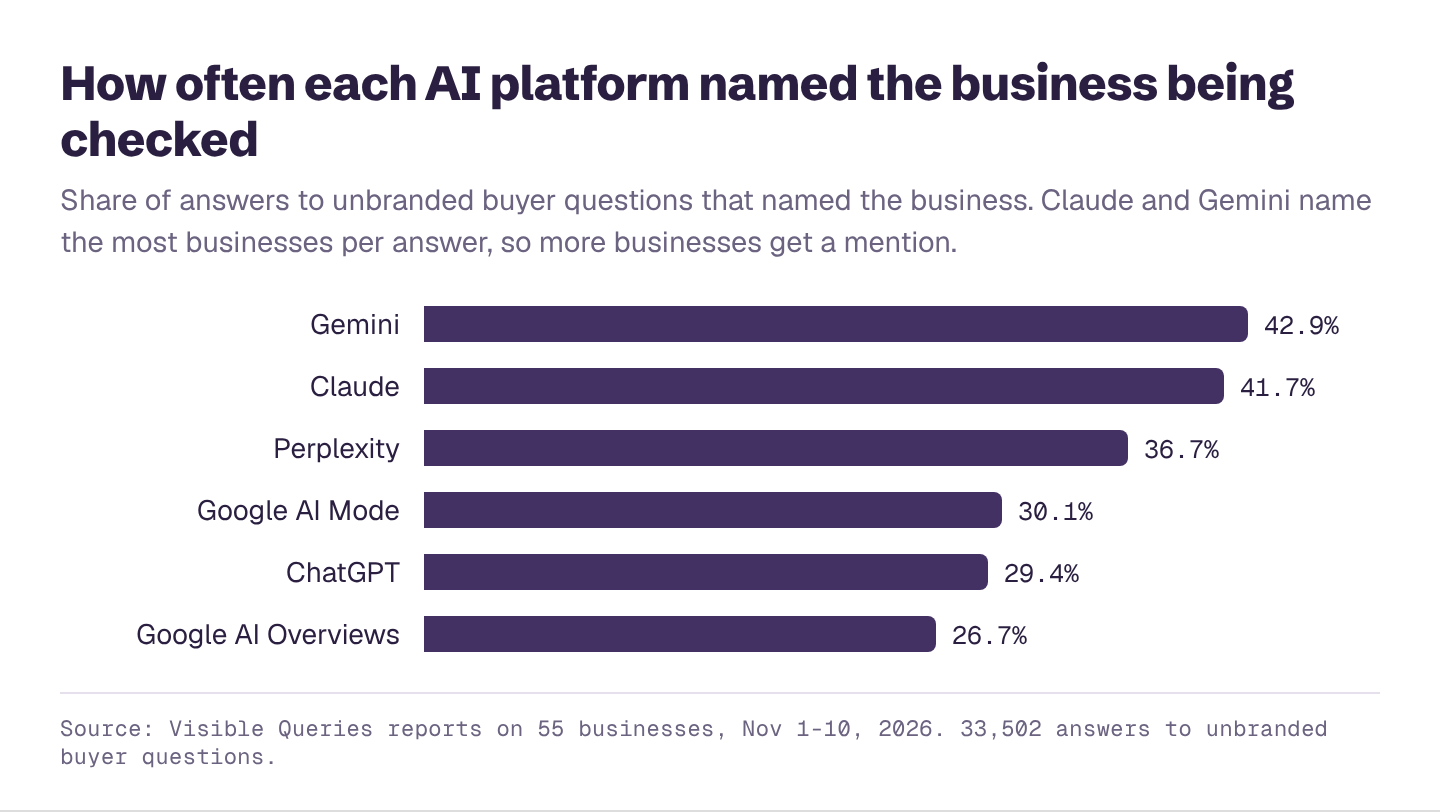
- But ranking isn't the same as being named. AI Overviews named the business being checked in 27% of answers to unbranded buyer questions in our reports, the lowest of any platform we track.
- The lists are short. AI Overviews named 4.3 businesses per answer on average; AI Mode named 4.8.
- Clear, quotable answers win. Pages that answer the question directly and specifically are the easiest for Google's AI to use.
Want to know if Google's AI already names you? Run the free AI Overviews checker before you change anything.
What Google says
Google's guidance on AI features is short and worth reading in full. The key points:
- "There are no additional requirements to appear in AI Overviews or AI Mode, nor other special optimizations necessary."
- To be eligible, "a page must be indexed and eligible to be shown in Google Search with a snippet."
- "You don't need to create new machine readable files, AI text files, or markup to appear in these features."
In other words, the foundations are the same as for Google Search. What changes is that the AI picks a few sources to quote and a few businesses to name, rather than listing ten links.
AI Overviews vs AI Mode
| AI Overviews | AI Mode | |
|---|---|---|
| Where it appears | At the top of a normal Google results page | A separate conversational search tab |
| What it looks like | A summary with links to sources | A full written answer, with follow-up questions |
| Named the business (our reports) | 26.7% of unbranded answers | 30.1% |
| Linked to the business's site | 11.8% | 11.0% |
| Businesses named per answer | 4.3 | 4.8 |
Visible Queries reports on 55 businesses, November 1 to 10, 2026.
Both draw on Google's index, so the same work helps both.
Why you can rank and still be left out
Ranking on page one gets you into the pool of pages Google's AI might read. It doesn't guarantee a mention. Google's AI writes a summary from several pages, and the businesses it names are the ones those pages agree on.
That's why third-party pages matter as much as your own. If the top-ranking "best of" articles for your category all list the same four competitors, those four are who the AI Overview names, even if your own page ranks third. We cover this in more depth in ranking on Google vs being recommended by AI.
Step 1: Make sure Google can use your pages
- Indexed. Check the page in Google Search Console's URL inspection. If it's not indexed, it's not eligible.
- Snippet allowed. Avoid
nosnippetand very shortmax-snippetsettings on pages you want quoted. - Crawlable content. Important text should be in the page itself, not only in images, PDFs or tabs that load later.
- Fast and mobile-friendly. The same page experience basics apply.
Step 2: Answer the question in the first lines
Google's AI quotes clear passages. For each topic you want to win:
- Use the buyer's question as a heading, or close to it.
- Answer it in one or two sentences right underneath. Then explain.
- Include the specifics a buyer would want: price ranges, who it's for, how long it takes, where you serve.
- Use tables for comparisons and numbered lists for steps.
Step 3: Get onto the pages Google's AI cites
Search your most important buyer questions and look at the sources linked in the AI Overview. Usually it's a mix of list articles, review sites, forums and a few business sites. Getting onto those pages, by outreach, PR, reviews or partnerships, is often faster than outranking them. Our guide to getting onto the sources AI cites shows how.
Step 4: For local businesses, own your Google Business Profile
For "near me" and city searches, Google's AI leans on local data. Keep your Business Profile complete: categories, services, hours, photos, and a steady flow of reviews. Make sure the same name, address and phone number appear on your site and in every directory.
Step 5: Add structured data where it fits
Google says special markup isn't required for AI features, but structured data still helps Google understand your pages generally. Mark up your business details, products, prices, reviews and FAQs where they're genuinely on the page. See schema markup for AI search.
Step 6: Measure your AI Overviews visibility
Search Console doesn't separate AI Overview impressions from regular results, and you can't see whether you were named in the summary. You need to ask the questions and record the answers. Our free Google AI Overviews checker scores you on AI Overviews and AI Mode next to ChatGPT, Claude, Gemini and Perplexity.
If you only fix three things
- Confirm your key pages are indexed and allowed to show snippets.
- Rewrite the top of your main service pages so they answer the buyer's question in two sentences.
- Get onto the list articles that Google's AI Overviews cite for your top three searches.
See if Google's AI names you
Enter your website and get a free AI visibility report. It takes a few minutes, and you'll see:
- Your AI visibility score, overall and for ChatGPT, Gemini, Claude, Perplexity and Google's AI Overviews and AI Mode
- Who AI recommends instead of you, and how often
- Which topics you win and lose, and how often each one is searched
- What AI gets wrong about you, and what to fix first
- A downloadable PDF you can share with your team