Show every client where they stand in AI answers.

Clients are starting to ask why they don't show up in ChatGPT. Run a free check on any client or prospect and walk in with a clear score, the competitors AI picks instead, and the gaps behind it.

FreeJust a URL, no setupScore in a few minutes
SEO agenciesContent agenciesPR firmsPerformance marketingWeb design studiosFractional CMOs

Why AI visibility belongs in your client work

01

Clients are already asking

Founders and marketing leads type their own category into ChatGPT, don't see their name, and ask their agency why. Having a clear answer, with the numbers behind it, keeps you the expert in the room.

02

It shows up nowhere in their analytics

When a buyer reads an AI answer and never clicks, there is no visit, no ranking and no referral to report. A visibility check makes that invisible part of the funnel something you can measure and discuss.

03

It points straight at the work you already sell

Missing from best-of lists, outranked on comparison questions, wrong facts about pricing: each gap maps to content, PR, reviews or site fixes. The report gives the brief, your team does the work.
Questions you can answerYour report is built from the company's own website, buyers and competitors, and answers these in plain language.

  • “Is my client named when buyers ask AI for the best option in their category?”
  • “Which competitors does AI recommend instead, and how often?”
  • “Which topics and sites are competitors winning?”
  • “Did our work move the needle since last month?”
How agencies use it
  1. Open the pitch with a finding

    Bring a prospect their own score and the competitors AI names instead. It turns a cold meeting into a conversation about real gaps.

  2. Set a baseline on day one

    Check a new client before work starts, so every result after that has a clear before and after.

  3. Re-check and show progress

    Run the check again each month and show the client how their score and share of voice have moved.

Real situations

When agencies run a check

Pitching a new prospect

The situation
You have a first meeting next week and want to open with something the prospect hasn't seen before.
Look at
Their score, the competitor AI names most often instead of them, and the topics where a competitor is recommended and they aren't mentioned.
Then
Open the meeting with those answers on screen. Then show which gaps your team would close first and how you'd measure progress.

Onboarding a new client

The situation
The contract is signed and you need a starting point everyone agrees on before work begins.
Look at
The headline score, share of voice against every competitor, and the AI platforms where the client drops out of answers.
Then
Save the PDF as the day-one baseline. Agree which numbers you will move, such as share of voice on comparison questions, and put them in your reporting.

Monthly or quarterly reporting

The situation
The client wants to see results beyond traffic and rankings.
Look at
A fresh check against the baseline: the score, mention rate, share of voice and accuracy, plus the gaps that have closed and the ones still open.
Then
Add an AI visibility slide to the regular report, showing the before-and-after and the answers that changed.

Making the case for new work

The situation
You think the client needs review generation, PR or new comparison pages, but the budget holder isn't convinced.
Look at
The sources AI trusts in their category, the comparison questions they lose, and how AI describes the competitor that wins.
Then
Tie each proposed project to a specific gap in the report, so the budget conversation is about closing that gap rather than about tactics.

What you'll seeScreenshots come from a sample report for Brightlane, a made-up real estate CRM.

01

A score clients understand

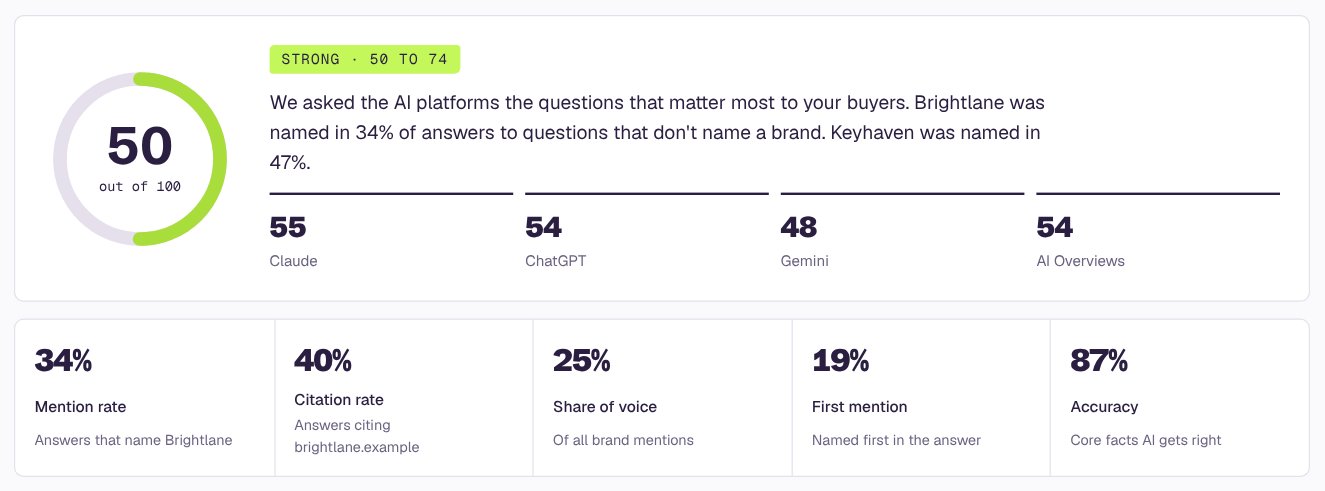
One number out of 100, what it means in plain words, and a score for each AI platform. Easy to put on a slide.

Sample report: AI visibility score and a score for each AI platform
02

Who AI recommends instead

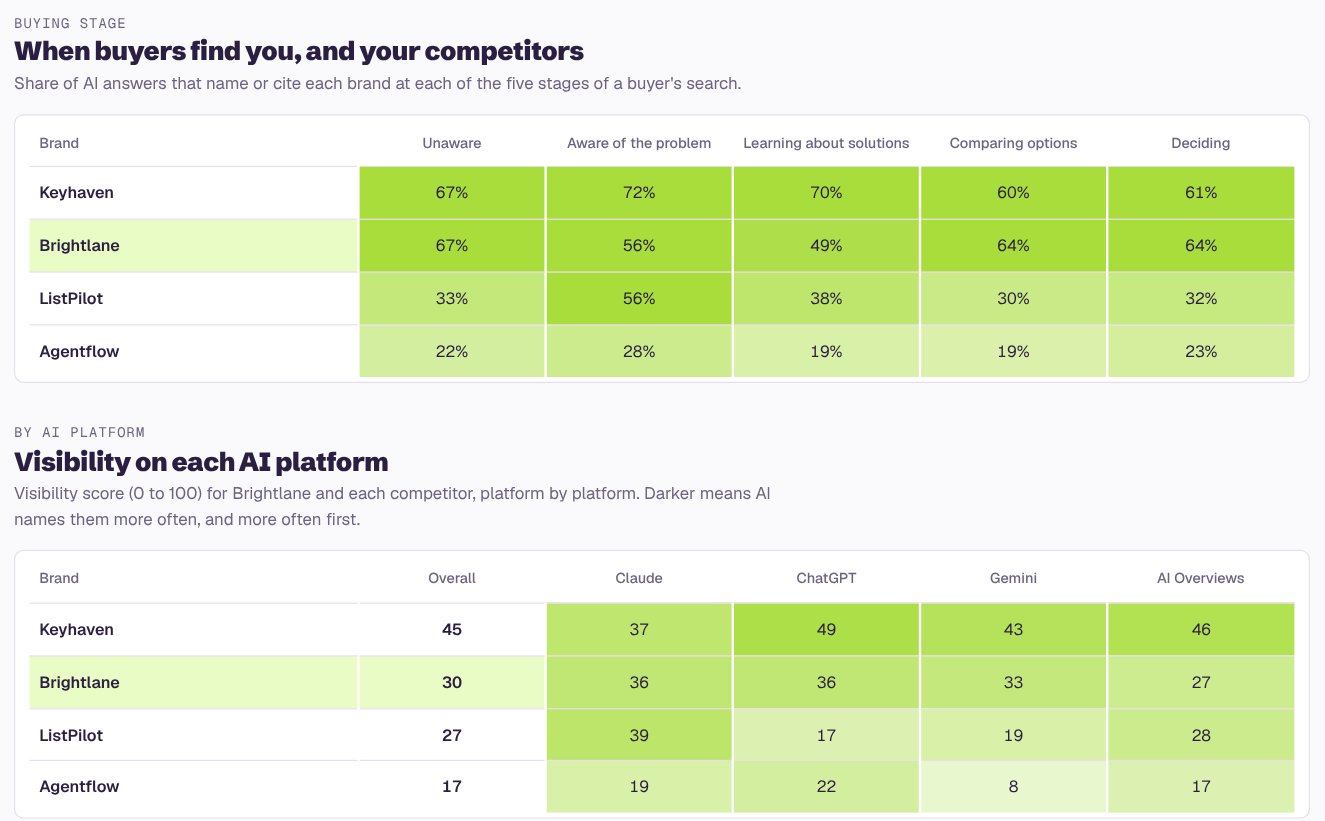
How often AI names your client and each competitor on every platform. The fastest way to show a client what's at stake.

Sample report: How often AI names you and your competitors
03

A brief for the work

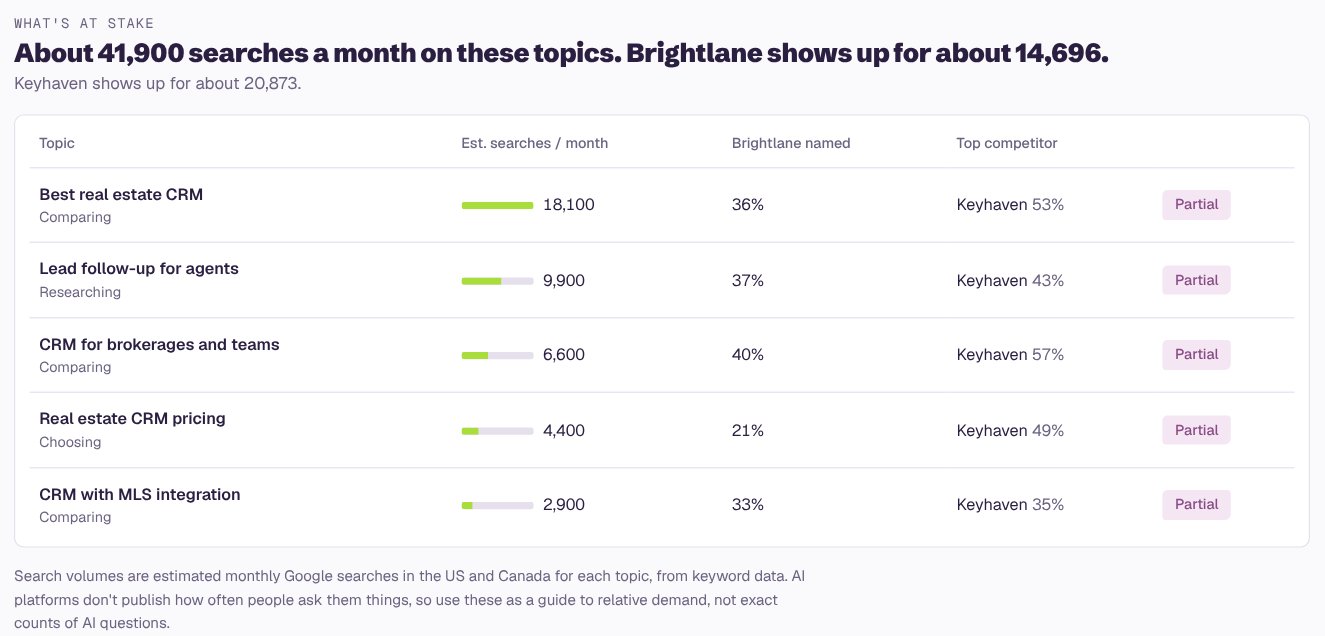
The buyer questions where AI leaves your client out and who it recommends instead, grouped by theme. Each one maps to content, PR, reviews or site fixes.

Sample report: Your biggest gaps
04

A report you can hand over

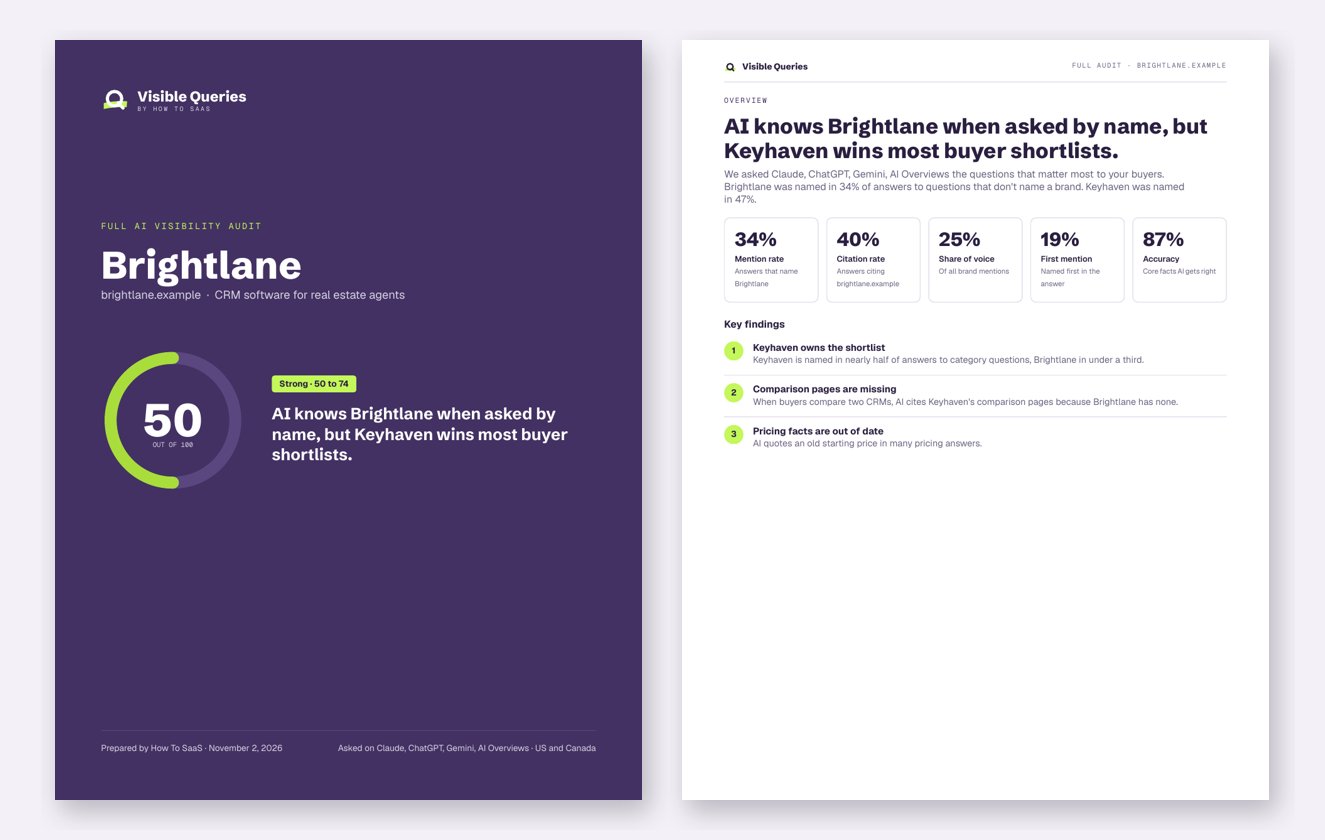
The areas to focus on first, plus a 2-page PDF summary for the client's leadership team.

Sample report: The bottom line

How to read the reportWhat a strong and a weak result look like, in plain terms.

Good signs

  • Named on best-of and “which should I pick” questions, not only when the brand is asked about directly
  • Share of voice close to, or ahead of, the biggest competitor
  • AI links to the client's own site as a source
  • Facts about pricing, services and locations come back right

Warning signs

  • One competitor named first again and again across platforms
  • The client only appears when the question already names them
  • AI repeats old pricing, a former product name or the wrong locations
  • A competitor owns the review and roundup sites AI cites most

Questions

Can I run a check on a client's or prospect's website?

Yes. Enter any company's URL and confirm its buyers and competitors. The report goes to the work email you use, so you control when the client sees it.

Does the company I check get notified?

No. The check reads the public website and asks AI platforms questions, the same way a buyer would. Nothing is installed and nothing is sent to the company.

How often can I re-check the same client?

Once per domain every 30 days. That lines up with a monthly reporting rhythm, and in between you'll see the latest report.

Can I share the report with the client?

Yes. Every report comes with a 2-page PDF summary you can send or present.

Does it work for local and non-software clients?

Yes. It reads the site to work out what kind of business it is, words the questions for that industry, and for businesses that serve specific cities it checks visibility city by city.

How it worksHow the AI visibility score is worked outRead the methodology →
Free · a few minutes · just a URL

Run a free check on your next client.

Get one free score, side by side with competitors. Just enter a URL.

Real buyer questionsSee who AI recommends insteadNo setup, no credit card