How to show up in Claude: getting Anthropic's AI assistant to recommend you
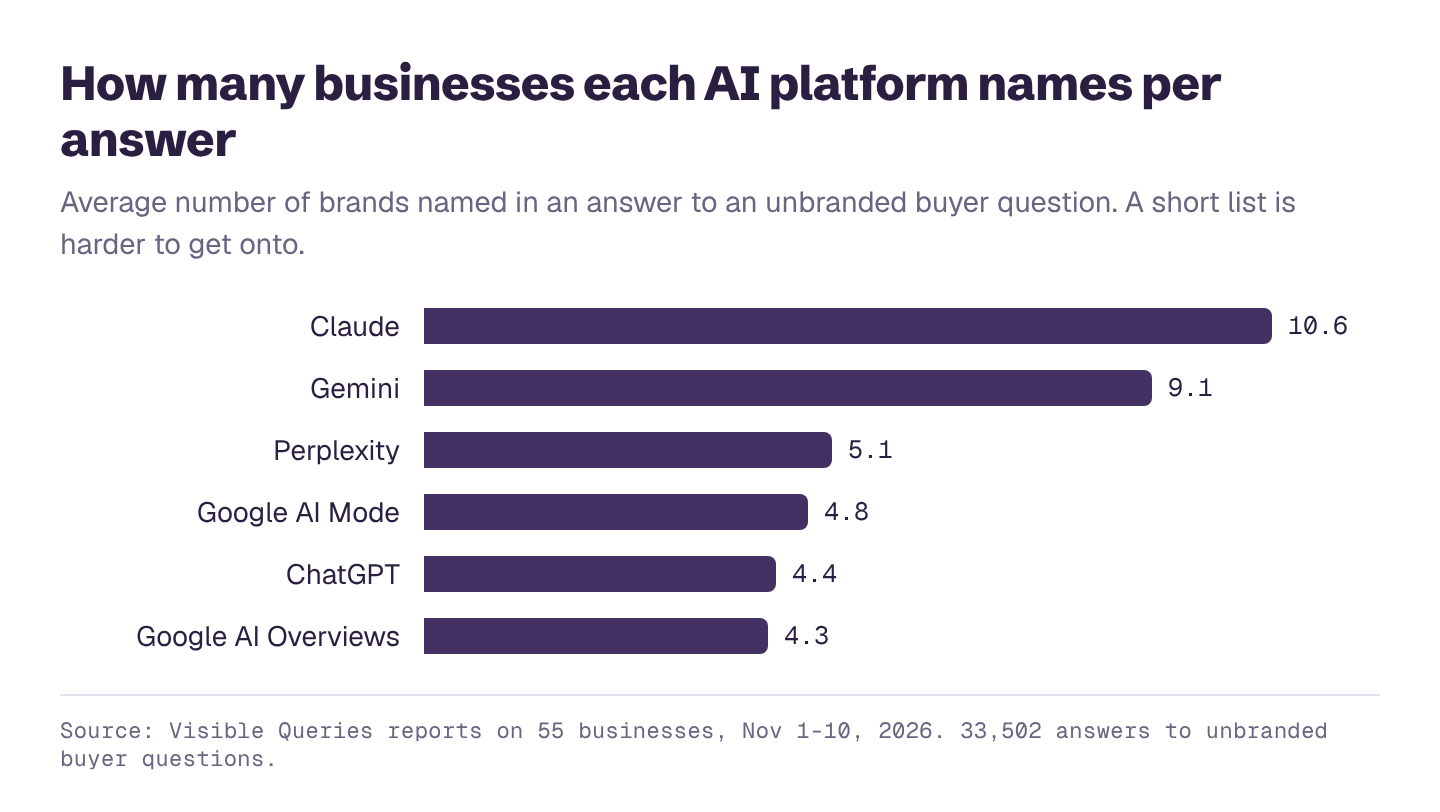
Claude names more businesses per answer than any other AI assistant we track. How Claude searches the web, which crawlers to allow, and what helps your business make its lists.
"We're a 15-person architecture firm. Which project management tools should we look at, and why?"
Claude tends to answer with a thorough list: often ten or more options, grouped by type, with the trade-offs of each. Buyers who use Claude for work research read those lists carefully.
This guide covers how Claude finds businesses and what helps you appear. For every platform at once, see how to get recommended by AI.
The short version
- Claude names the most businesses of any AI assistant we track: 10.6 per answer on average in our reports, more than twice ChatGPT's 4.4.
- It named the business being checked in 42% of answers to unbranded buyer questions, and linked to its website in 13%.
- It searches the web with a partner search engine. Evidence reported by TechCrunch suggests it's Brave Search; Anthropic hasn't said so publicly.
- Anthropic runs separate crawlers for search and training, so you can allow one and block the other.
Not sure whether Claude names you? Check your score for free; the report shows Claude next to every other platform.
How Claude finds businesses
When web search is on, Claude searches, reads the results, and writes its answer from what it finds. Anthropic's support page on its crawlers lists three bots:
| Bot | What Anthropic says it does |
|---|---|
| Claude-SearchBot | "Navigates the web to improve search result quality for users" |
| Claude-User | Accesses websites "when individuals ask questions to Claude" |
| ClaudeBot | Collects web content "that could potentially contribute to their training" |
Anthropic says its bots honor robots.txt. If you want to appear in Claude's search answers but don't want your content used for training, you can allow Claude-SearchBot and Claude-User and block ClaudeBot.
As for which search engine Claude uses: in March 2025, TechCrunch reported that Anthropic had added Brave Search to its list of subprocessors and that "at least one search in Claude and Brave returned identical citations." It's reasonable to treat Brave as one input, without assuming it's the only one.
Why Claude's long lists are an opportunity
A list of ten leaves room for specialists, newer companies and regional players that a list of four wouldn't. Claude also tends to group options ("best for small teams", "best for enterprises", "best budget option"). If you're clearly the best fit for one group, you have a good chance of being named there.
Step 1: Allow Claude's search crawlers
Check robots.txt and your firewall for rules that block Claude-SearchBot or Claude-User. These are the ones that affect whether Claude can read your pages when it answers.
Step 2: Check your presence in Brave Search
Search Brave (search.brave.com) for your buyers' main questions and your business name. If your pages don't show up, make sure they're crawlable and linked from other sites; Brave builds its own index. Treat this as a quick check, not a project.
Step 3: Be clear about who you're best for
Because Claude sorts options by fit, say plainly who you serve: team size, industry, budget, location, use case. Put it on your homepage, your pricing page and your comparison pages. "Built for architecture and engineering firms of 5 to 50 people" is easier to repeat than "flexible software for teams".
Step 4: Get onto the comparison content Claude reads
For B2B questions especially, Claude leans on comparison articles, review sites and category roundups, as every AI assistant does. In our study of where AI gets its answers, 76% of the sources for software questions were comparison articles and lists. Getting into those, honestly and with useful detail, is the biggest lever.
Step 5: Keep facts consistent and current
Claude often describes pricing, features and limits. If those differ between your site, review sites and old articles, it may repeat the wrong version. Update everything at once when something changes.
Our free AI visibility checker scores you on Claude next to ChatGPT, Gemini, Perplexity and Google's AI features, so you can see where you stand.
If you only fix three things
- Allow Claude-SearchBot and Claude-User in robots.txt and at your firewall.
- State clearly who you're best for on your key pages.
- Get into the top comparison articles for your category.
See if Claude recommends you
Enter your website and get a free AI visibility report. It takes a few minutes, and you'll see:
- Your AI visibility score, overall and for ChatGPT, Gemini, Claude, Perplexity and Google's AI Overviews and AI Mode
- Who AI recommends instead of you, and how often
- Which topics you win and lose, and how often each one is searched
- What AI gets wrong about you, and what to fix first
- A downloadable PDF you can share with your team