How to track AI traffic in GA4: ChatGPT, Perplexity, Gemini and Claude visits
Set up an AI assistants channel in Google Analytics 4 in five steps, see which AI platforms send you visitors, and understand what GA4 can't show you about AI visibility.
When someone clicks a link in a ChatGPT, Perplexity, Gemini, Claude or Copilot answer and lands on your site, Google Analytics 4 records the visit. But by default it lumps those visits in with every other referral, so they're easy to miss.
This guide shows how to give AI visits their own channel in GA4, and what that number does and doesn't tell you.
The short version
- AI referrals show up in GA4 with sources like chatgpt.com and perplexity.ai.
- A custom channel group separates them from other referrals in five steps.
- They're a small slice of AI's real effect. Most people read AI answers without clicking. Our research found AI linked to the business's own site in only 14% of answers to unbranded buyer questions.
- Watch branded search and direct traffic too. People who hear about you from AI often search your name or type your address later.
GA4 only shows clicks. To see how often AI names you without a click, check your AI visibility score for free.
Step by step: an AI assistants channel
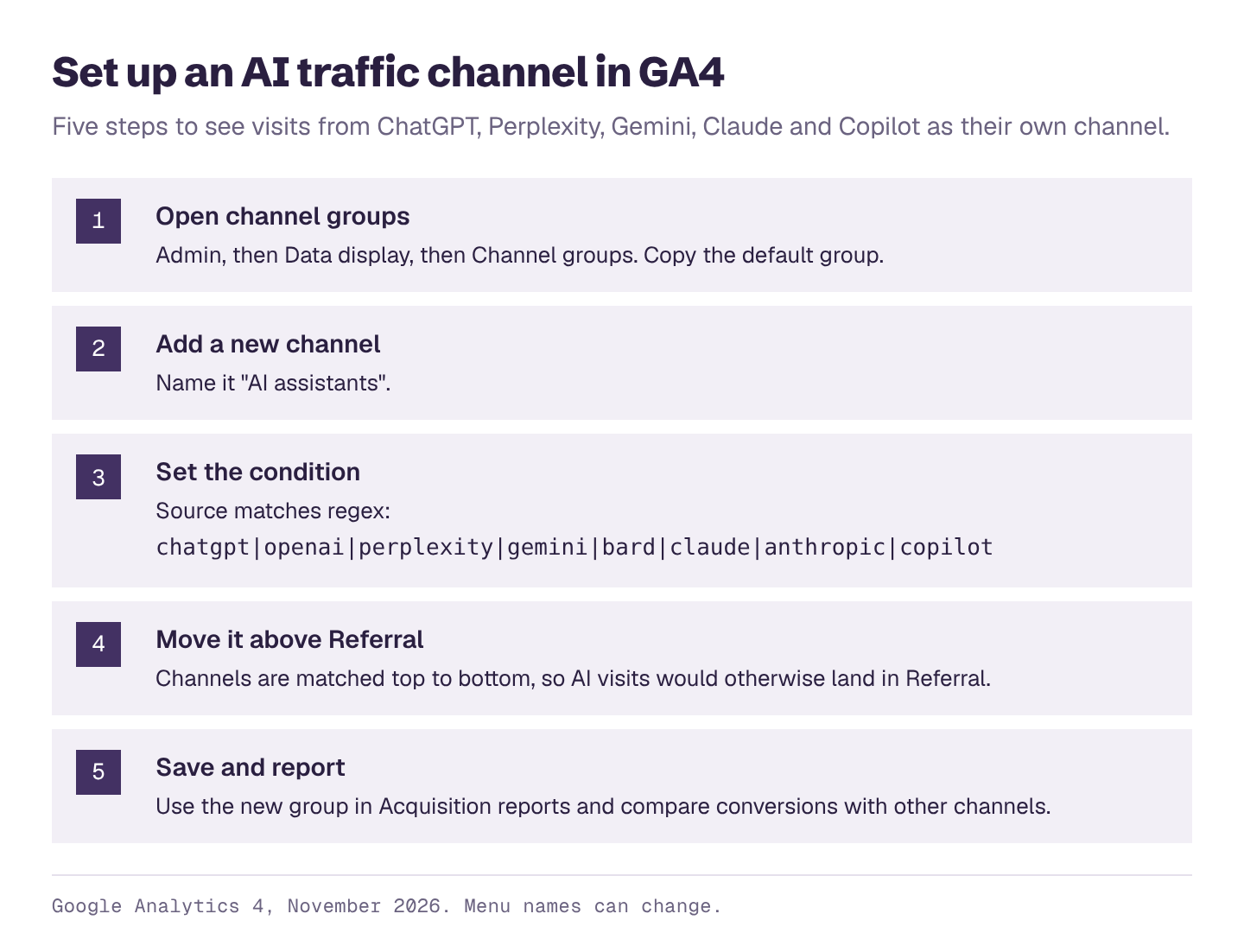
- Open channel groups. In GA4, go to Admin, then Data display, then Channel groups. Copy the default channel group so you can edit it.
- Add a new channel and call it "AI assistants".
- Set the condition: Source matches regex
chatgpt|openai|perplexity|gemini|bard|claude|anthropic|copilot. - Move it above Referral. GA4 assigns each visit to the first channel it matches, top to bottom, so AI visits would otherwise land in Referral.
- Save, then use it. In Acquisition reports, switch to your new channel group to see AI assistants as a row next to Organic Search, Direct and the rest.
The new group applies going forward. To look at past data, use an exploration with a filter on Session source matching the same regex.
Quick check without setup
If you just want a number today: open Reports, then Acquisition, then Traffic acquisition, change the dimension to Session source, and search for "chatgpt", "perplexity", "gemini" and so on.
What the numbers mean
AI referrals are the tip of the iceberg. A click only happens when an answer links to you and the reader wants more. In our reports, AI named the business in 32% of answers to unbranded buyer questions but linked to its site in 14%, and those are the best case, before anyone decides whether to click.
AI visitors often convert well. They arrive having already read a recommendation. Our guide to AI referrals and pipeline covers published data on this.
Some AI visits don't show as AI. Some apps don't pass a referrer, so a click from an AI answer can show up as Direct. And many people who read about you in AI later search your name. Watch direct and branded traffic alongside your AI channel.
What GA4 can't tell you
GA4 shows who clicked. It can't show:
- How often AI named you without a link
- Which competitors AI recommended instead
- Which questions you're missing from
- Whether AI got your facts right
For that, you have to ask the questions and record the answers. Our free AI visibility checker does it from your website address, on ChatGPT, Claude, Gemini, Perplexity and Google's AI Overviews and AI Mode.
See the AI visibility analytics can't show
Enter your website and get a free AI visibility report. It takes a few minutes, and you'll see:
- Your AI visibility score, overall and for ChatGPT, Gemini, Claude, Perplexity and Google's AI Overviews and AI Mode
- Who AI recommends instead of you, and how often
- Which topics you win and lose, and how often each one is searched
- What AI gets wrong about you, and what to fix first
- A downloadable PDF you can share with your team