How to show up in ChatGPT: getting your business recommended
How ChatGPT decides which businesses to name, why its shortlists are so short, and the steps that get you on them: crawler access, Bing, lists, reviews and pages ChatGPT can quote.
"Who are the best commercial cleaning companies in Chicago for a 20,000 square foot office?"
ChatGPT answers with four or five names, a line on each, and links to a few of the pages it read. For the companies on that list, it's a warm lead. For everyone else, it's a buyer who never knew they existed.
This guide explains how ChatGPT picks those names and what you can do to be one of them. For the bigger picture across every AI platform, start with our guide to getting recommended by AI.
The short version
- ChatGPT searches before it recommends. For questions about businesses and products, it usually runs a web search, reads the results, then writes a shortlist.
- Its lists are short. In our reports, ChatGPT named 4.4 businesses per answer on average, about half as many as Claude or Gemini.
- It links to business websites often. ChatGPT cited the business's own site in 21% of answers to unbranded questions, second only to Perplexity.
- Blocking the wrong crawler removes you. OpenAI says sites that block OAI-SearchBot "will not be shown in ChatGPT search answers."
- Lists and reviews matter most. ChatGPT names the businesses that appear across the "best of" lists, review sites and articles it reads.
If you're not sure whether ChatGPT names you, check here for free. You'll see your ChatGPT score next to the other AI platforms in a few minutes.
How ChatGPT finds businesses to recommend
ChatGPT has two ways of knowing about you: what it learned in training, and what it finds when it searches. For anything about choosing a business, search usually wins, because training data is months old and buyers want current options.
OpenAI runs a dedicated crawler for this. In its own words, "OAI-SearchBot is for search. OAI-SearchBot is used to surface websites in search results in ChatGPT's search features." It also uses search partners; TechCrunch reports that "OpenAI has a partnership with Bing" alongside other sources.
So there are two practical consequences: ChatGPT needs to be able to crawl you, and ranking well in Bing helps, not just Google.
Why ChatGPT is hard to get into
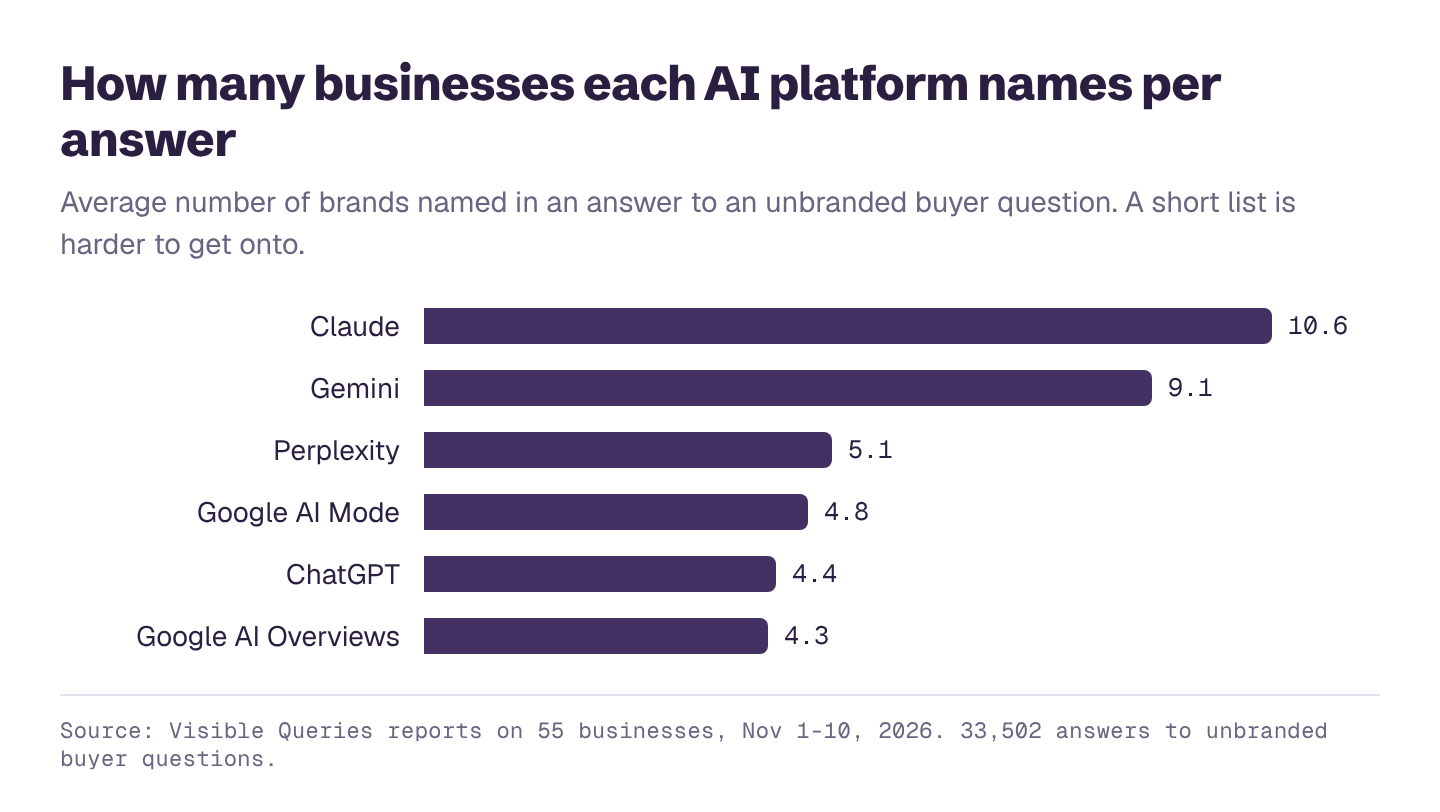
With only four or five places on the list, ChatGPT rewards the businesses that show up most consistently across sources. In our reports, it named the business being checked in 29% of answers to unbranded questions, compared with 43% for Gemini and 42% for Claude.
The upside: when ChatGPT does name you, it often links to you. It cited the business's own website in 21% of unbranded answers, twice the rate of Gemini.
Step 1: Check that ChatGPT can read your site
Open yoursite.com/robots.txt and look for these lines:
| Crawler | What it does | Should you allow it? |
|---|---|---|
| OAI-SearchBot | Finds pages for ChatGPT search answers | Yes, if you want to be recommended |
| ChatGPT-User | Fetches a page when a user asks ChatGPT to | Yes. OpenAI says it isn't used to decide what appears in search |
| GPTBot | Collects content for training OpenAI's models | Your choice. Blocking it doesn't remove you from search |
OpenAI notes it "can take ~24 hours from a site's robots.txt update" for its systems to adjust. Also check that your firewall or CDN isn't blocking these bots by default; some security settings do.
Step 2: Get into Bing
Many sites have never looked at Bing. Because ChatGPT uses Bing as one of its sources, it's worth an hour:
- Verify your site in Bing Webmaster Tools. You can import it from Google Search Console in a few clicks.
- Submit your sitemap there.
- Check for crawl errors and pages Bing hasn't indexed.
- Turn on IndexNow if your website platform supports it, so Bing hears about new pages right away.
Step 3: Get onto the lists ChatGPT reads
Ask ChatGPT the questions your buyers ask and look at the sources it cites. You'll usually see the same handful of list articles, review sites and directories come up again and again. Those are your targets.
- "Best of" lists. These made up 40% of sources AI cited in our study. Contact the authors, offer an expert quote, a customer story or data, and ask to be considered next time they update.
- Comparison articles. For software and B2B services, comparison pages dominate. In our study, 76% of sources for software questions were comparison articles and lists.
- Your own comparison content. Honest "us vs them" and "best tools for X" pages on your own blog get cited too, if they're genuinely useful.
Step 4: Strengthen your reviews
For local questions, ChatGPT reads review sites heavily. In our study of which review sites AI trusts, Yelp was the most-cited review site in 11 of 13 industries, and almost every Yelp link was to a search page like "Best HVAC in Dallas", not a business's own page. Where you rank inside those review sites is what ChatGPT sees.
Ask happy customers for reviews on the sites that come up for your category, reply to reviews, and keep your listings complete.
Step 5: Write pages ChatGPT can quote
When ChatGPT links to a business, it's linking to a page that answered part of the question clearly. Help it:
- One clear page per service and per city you want to be recommended for.
- A direct answer at the top: who you serve, where, what it costs, what makes you different.
- Specific facts: prices or price ranges, service areas, response times, certifications, years in business.
- An FAQ with the questions buyers actually ask.
- Up-to-date details. ChatGPT will repeat an old price if that's what it finds.
Step 6: Measure it properly
Asking ChatGPT once about your own company tells you very little. ChatGPT personalizes answers using your past chats and location, and answers vary from run to run. In our stability test, the first business named changed in more than half the questions across four runs.
A proper check asks many unbranded buyer questions fresh, counts how often you're named and linked, and compares you with competitors. Our free ChatGPT visibility checker does this, alongside Claude, Gemini, Perplexity and Google's AI features.
If you only fix three things
- Make sure OAI-SearchBot isn't blocked in robots.txt or by your firewall.
- Set up Bing Webmaster Tools and submit your sitemap.
- Get onto the three list articles ChatGPT cites most for your category.
See if ChatGPT recommends you
Enter your website and get a free AI visibility report. It takes a few minutes, and you'll see:
- Your AI visibility score, overall and for ChatGPT, Gemini, Claude, Perplexity and Google's AI Overviews and AI Mode
- Who AI recommends instead of you, and how often
- Which topics you win and lose, and how often each one is searched
- What AI gets wrong about you, and what to fix first
- A downloadable PDF you can share with your team