How to fix wrong information AI says about your business
AI assistants sometimes quote old prices, closed locations or services you don't offer. Here's how to find where the wrong fact comes from and get it corrected at the source.
A customer calls and asks for the Saturday hours you stopped offering two years ago. Another asks about a service you dropped. A third mentions a price you haven't charged since before the pandemic. When you ask where they heard it, the answer is the same each time: "That's what ChatGPT said."
Wrong information in an AI answer is worse than wrong information on a random website. Nobody reads a random website as the final word. An AI answer arrives as a confident summary, written as if it were checked. Buyers act on it. Some of them will never call to find out it was wrong. They'll pick someone else.
The good news is that AI assistants don't invent most of these errors from nothing. They repeat something they read. Find what they're reading, fix it, and the answers follow. This guide walks through how.
Why AI gets facts about businesses wrong
It helps to know where an answer comes from before trying to change it. When a buyer asks an assistant about a business, the answer is built from two places.
What the model learned in training. Every AI model is trained on a large snapshot of the web, taken at some point in the past. Anything it "knows" about your business from that snapshot can be months or years old. If your prices, hours or services changed after the snapshot, the model's memory still has the old version.
What it finds when it searches. Most assistants now search the web when a question needs current information, then summarize the pages they find. This is where most fixable errors come from. If the pages it finds are out of date, the answer will be too.
From there, a few specific things cause most of the mistakes:
- Old pages on your own site. A 2021 blog post announcing a promotion, a services page for something you no longer do, a staff page listing people who've left. Your site is one of the first places an assistant looks, and it doesn't know which pages you've forgotten about.
- Directory and listing sites you haven't touched in years. Business directories, review sites and industry listings often hold old addresses, phone numbers and hours long after you've moved on.
- Inconsistent details across the web. If your Google Business Profile says one thing, Yelp says another and your website says a third, the assistant has to pick. It won't always pick the right one.
- A similar name. If another business has a name close to yours, especially in another city, an assistant can blend the two together.
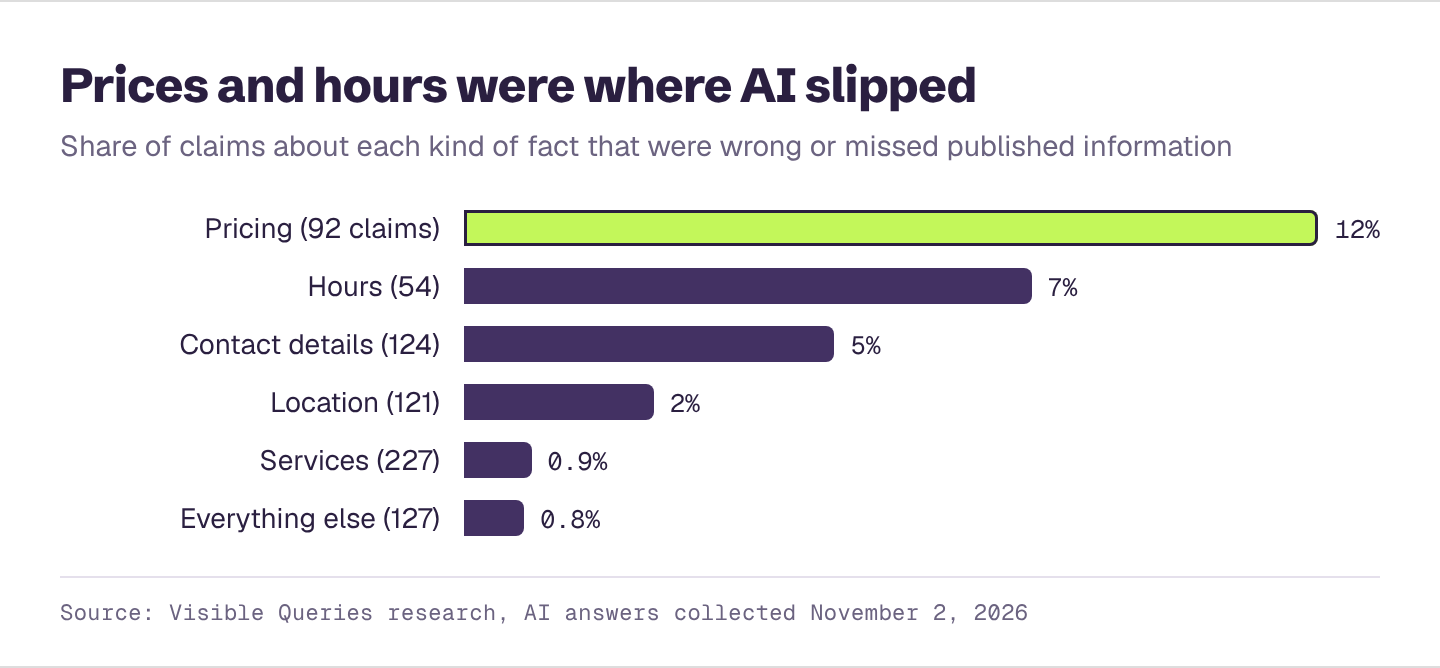
- Gaps. When nothing on the web answers a buyer's question, like what you charge, an assistant may fill the gap with a typical figure for your industry, or with a guess that sounds specific.
- Third-party articles. "Best of" lists, local news stories and comparison articles get cited often and are rarely updated. One stale line in a popular article can show up in answers for years.
Step 1: Find out exactly what's wrong
Start by collecting the errors, not just noticing one. Ask the assistants your customers use the questions a buyer would ask about you. Use a private browser window, start a new chat for each question, and make sure web search is on.
- "What can you tell me about [your business] in [your city]?"
- "What services does [your business] offer?"
- "What are [your business]'s hours?"
- "How much does [your business] charge for [your main service]?"
- "Where is [your business] located?"
- "Who owns [your business]?" or "Who founded [your business]?"
- "Does [your business] [take my insurance / offer free estimates / ship to Canada]?"
Ask the important ones two or three times. Answers can change from one try to the next, and an error that appears once may not be worth chasing, while one that appears every time is.
For each wrong answer, write down:
- The exact wrong claim.
- What's actually true.
- Which assistant said it.
- The sources the answer cited, if it showed any. Copy the links.
That last column is the most important. It's your map to the fix.
Our guide on how to check your AI visibility yourself covers the full setup for asking questions fairly and recording the results.
Step 2: Trace each error to its source
With your list in hand, find where each wrong fact lives.
If the answer cited sources, open them. Look for the wrong fact on each linked page. Most of the time, it's sitting right there: the old hours on a directory listing, the dropped service on an old page of your own site, the outdated price in an article from three years ago.
If it didn't cite sources, search for the wrong fact yourself. Put the wrong detail in quotes in a regular search engine along with your business name. Try "[your business]" "open Saturdays" or "[your business]" "$99". Then check the usual suspects by hand:
- Your own website, including old blog posts, landing pages and PDFs.
- Your Google Business Profile and Bing Places listing.
- Review and directory sites in your industry.
- Social media profiles, especially the "about" sections.
- Local news stories and "best of" lists that mention you.
- Any business you were acquired by, merged with or spun off from.
If the wrong fact isn't anywhere you can find, it's probably either coming from the model's training memory, or the assistant filled a gap with a guess. The fix for both is the same: publish the correct fact clearly, in places the assistant reads, so a search finds the right answer.
Step 3: Fix it at the source
Fix the source, not the answer. You can't edit what an assistant says directly, but you can change what it reads.
Your own website
This is the one you control completely, so start here.
- Update or remove outdated pages. If you no longer offer a service, take its page down or rewrite it to say so. If you need to keep an old blog post, add a clear note at the top: "Update: we no longer offer this service as of 2025."
- State key facts plainly, in words. Hours, locations, service areas, what you do and don't offer, and pricing (or a price range) should be written out as text on the page, not only in an image, a PDF or a widget that loads later. Assistants read text.
- Put facts where people look for them. A clear "Hours and locations" section, a "Services" page that lists every service, and a "Pricing" or "What it costs" page all make the right answer easy to find.
- Add structured data. Structured data (schema markup) is a small block of code that tells machines your business name, address, phone number, hours and more, in a standard format. Your web developer or website platform can add it. It's a clear, machine-readable statement of the facts.
Business profiles and directories
- Claim and update your Google Business Profile and Bing Places listing. Check hours, holiday hours, address, phone, website, services and categories.
- Update the directories in your industry. Start with the ones the AI answers cited. Then cover the major ones: review sites, local directories, and industry-specific listings like the ones lawyers, doctors, contractors or software companies are found on.
- Make every listing match. Use the exact same business name, address and phone number everywhere. Small differences ("Suite 200" vs "#200", an old phone number) create the kind of conflict that leads to wrong answers.
- Close duplicate and old listings. If there's a listing for a location you closed, or a duplicate profile someone created years ago, ask the site to merge or remove it.
Articles and lists you don't control
- Ask for a correction. Editors and site owners generally want their pages to be accurate. A short, polite email works best: the page, the wrong line, the correct fact, and a link to where it's stated on your site.
- Give them something to update. If the article is a "best of" list, offer an updated description of your business in a sentence or two.
- Don't argue with reviews in public. If the wrong fact comes from a customer review, reply politely with the correct information. Don't ask the customer to change it, and never post fake reviews to bury it.
If a similar business is being mixed up with yours
Make it easy to tell you apart. Use your full name and city consistently, describe what you do specifically on your homepage, and make sure your listings carry your exact address. If the confusion is serious and comes from one site, ask that site to fix it.
Step 4: Tell the AI platforms directly, where you can
Most assistants have a way to flag a bad answer, usually a thumbs-down button with a box to explain what's wrong. Use it, and include the correct fact and a link to where it's stated. It's not a guaranteed fix, and it won't work on its own without the source fixes above, but it costs a minute.
For Google's AI Overviews, use the feedback link that appears under the overview. Fixing your Google Business Profile and your website matters more, since those are what Google reads.
Step 5: Check again, and keep checking
Changes don't show up in AI answers overnight. Assistants need to search again and find the updated pages, and some sites take time to refresh their listings. Give it a few weeks, then rerun the same questions from Step 1 and compare.
Expect three outcomes:
- Fixed. The answer now has the right fact. Move on.
- Still wrong, same source. The page you fixed hasn't been picked up yet, or there's another page saying the same wrong thing. Look again.
- Still wrong, no source. The error may be coming from the model's training memory. Keep publishing the correct fact clearly and consistently. As assistants lean more on live search for current details, a well-documented fact usually wins.
After that, make checking a habit. Any time you change your hours, prices, services, locations or ownership, update your site and listings the same week, and ask the assistants again a few weeks later.
How to prevent errors in the first place
Most wrong answers trace back to the same few habits. A little upkeep keeps them from starting.
- Keep one master fact sheet. Write down your official name, address, phone, hours, services, service area and pricing in one document. Every listing and page should match it.
- Update everywhere at once. When something changes, work through every place it appears: your site, your profiles, your directories, your social bios.
- Retire old pages properly. Don't leave outdated pages live and unlinked. Update them, redirect them, or remove them.
- Answer the questions buyers ask. If buyers want to know what you charge, give a range. If they ask whether you take a certain insurance or serve a certain area, say so on your site. An unanswered question is an invitation for an assistant to guess.
- Check quarterly. Ask the assistants about your business every few months. Errors are much easier to fix when they're new.
Wrong facts are one of the few problems in AI visibility with a clear, direct fix. You don't need to outrank anyone or win a new review. You just need the truth to be easy to find.
Find out what AI gets wrong about you
Enter your website and get a free AI visibility report. It takes a few minutes, and you'll see:
- What AI gets wrong about you, and what to fix first
- Who AI recommends instead of you, and how often
- Your AI visibility score, overall and for each AI platform
- A downloadable PDF you can share with your team