The AI visibility checklist for your website
A practical checklist of what your website needs so AI assistants can understand your business, describe it correctly and recommend it to the right buyers.
When a buyer asks an AI assistant who to hire or what to buy, the assistant usually searches the web, reads a handful of pages and writes a summary. Your website is one of the pages it can read. Whether it comes away knowing what you do, who you do it for and why you're a good pick depends a lot on what it finds there.
Most websites weren't built with that reader in mind. They were built for a person scrolling on a phone, or for a search engine matching keywords. An AI assistant reads differently. It's trying to answer a specific question in a few sentences, and it needs plain, specific facts it can repeat with confidence.
This checklist covers what to have on your site so that happens. It works for any kind of business: software, professional services, local services, clinics, stores, schools. Nothing on it is a trick. Every item also makes your site better for the people who visit it.
1. Say what you do, in plain words, on your homepage
The first thing an assistant needs to know is what kind of business you are. It sounds obvious, but many homepages lead with a slogan that could describe anyone.
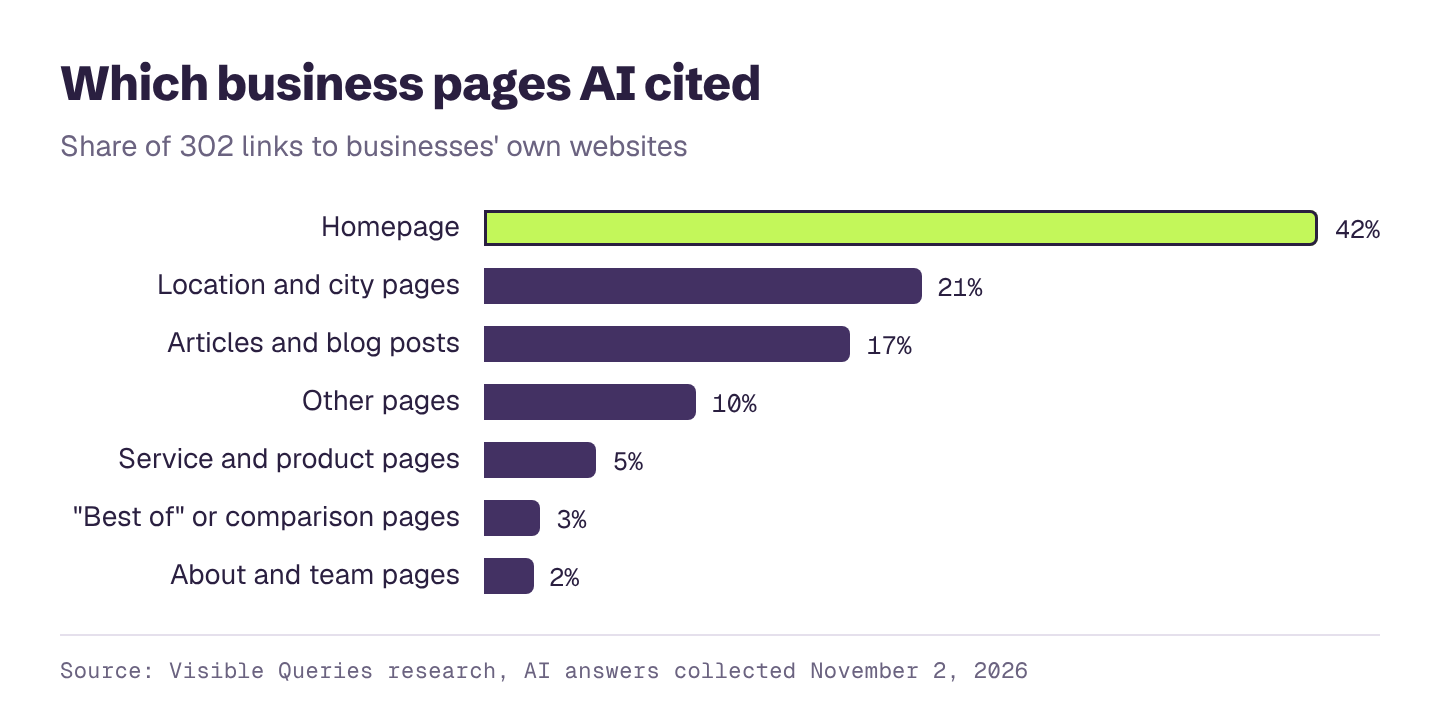
- Your homepage says, in one plain sentence near the top, what you do and who you do it for. "We're a family dental practice in north Calgary" beats "Smiles that last a lifetime."
- The words match how buyers describe what they need. If customers search for "bookkeeping for restaurants," say "bookkeeping for restaurants," not "financial clarity for hospitality."
- Your business type and main category are clear: a law firm, an HVAC company, a payroll software company, a boutique hotel.
- Your page title and meta description say the same thing.
2. Give every service or product its own page
Assistants answer specific questions. "Who does emergency furnace repair in Denver?" is a different question from "Who installs heat pumps in Denver?" A single "Services" page with a bulleted list gives an assistant very little to go on for either one.
- Each main service or product has its own page.
- Each page explains what it is, who it's for, what's included and what it typically costs or how pricing works.
- Each page answers the questions buyers ask about that service: how long it takes, what to expect, what makes your approach different.
- Services you no longer offer are removed or clearly marked as discontinued.
3. Name your buyers and their situations
Buyers often describe their situation, not just their need: "a 20-person agency," "a first-time homebuyer," "a family with a toddler," "a manufacturer moving off spreadsheets." An assistant can only connect you to those situations if your site does.
- Your site names the kinds of customers you serve best, specifically.
- You have pages or sections for your main customer types or industries, if you serve more than one.
- You describe the problems you solve in the words those customers use.
- You're honest about who you're not right for. An assistant that knows your fit can recommend you with more confidence for the cases where you are right.
4. Make locations and service areas explicit
For any business that serves particular places, location is often the first filter in a buyer's question.
- Your full address, written as text, appears on your site, ideally in the footer of every page.
- Each location has its own page with its address, hours, phone number, and what's offered there.
- The cities, neighborhoods or regions you serve are listed in plain text, not just shown on a map.
- If you sell nationally or online, your site says where you sell and ship (for example, "We serve clients across the US and Canada").
5. Publish your prices, or at least a range
When a buyer asks what something costs, an assistant will answer one way or another. If your site doesn't say, it may quote a typical industry range, a competitor's price, or an old number it found somewhere else.
- You publish prices, starting prices or typical ranges for your main services or plans.
- If pricing depends on the job, you explain what it depends on, with an example or two.
- You say what's included and what costs extra.
- Price information is in text on the page, not only in an image or a downloadable PDF.
6. Put the basic facts where they're easy to find
The details buyers ask about right before they call or sign up are also the details assistants most often get wrong.
- Hours, including holiday and seasonal hours.
- Phone, email and how to book or get a quote.
- Insurance, payment options and financing, if they apply.
- Licenses, certifications and accreditations, with license numbers where your industry uses them.
- For software: integrations, security and compliance standards, and supported regions.
- All of it matches your Google Business Profile and other listings exactly.
7. Show proof that others can check
Assistants weigh what other people say about you. Your site can point to that proof and make it specific.
- Customer reviews or testimonials with real names, roles or locations, and specifics about what you did.
- Case studies or project examples with the problem, what you did and the result.
- Awards, rankings and memberships, with links to the organization that gave them.
- Press mentions, with links.
- Links to your profiles on the review and directory sites that matter in your industry.
8. Show the people and the expertise
For trust-heavy decisions, like a lawyer, a doctor, an advisor or a contractor working inside someone's home, who you are matters as much as what you do.
- An About page that explains who you are, how long you've been in business, and what you stand for.
- Team or provider pages with names, credentials and experience.
- Content written by your experts that answers real buyer questions in depth.
- Dates on articles, and old articles reviewed and updated.
9. Answer the questions buyers ask AI
The questions a buyer types into an AI assistant are often the same ones they'd ask on a first call. If your site answers them well, you give the assistant something good to quote.
- A page or section that answers the most common questions you get, in full sentences.
- Honest comparison content: how you differ from the main alternatives, and when each is the better choice.
- Guides that explain the problem your buyers have, not just your solution.
- Answers that stand on their own, so a sentence or two could be quoted without the rest of the page.
10. Make your site easy for machines to read
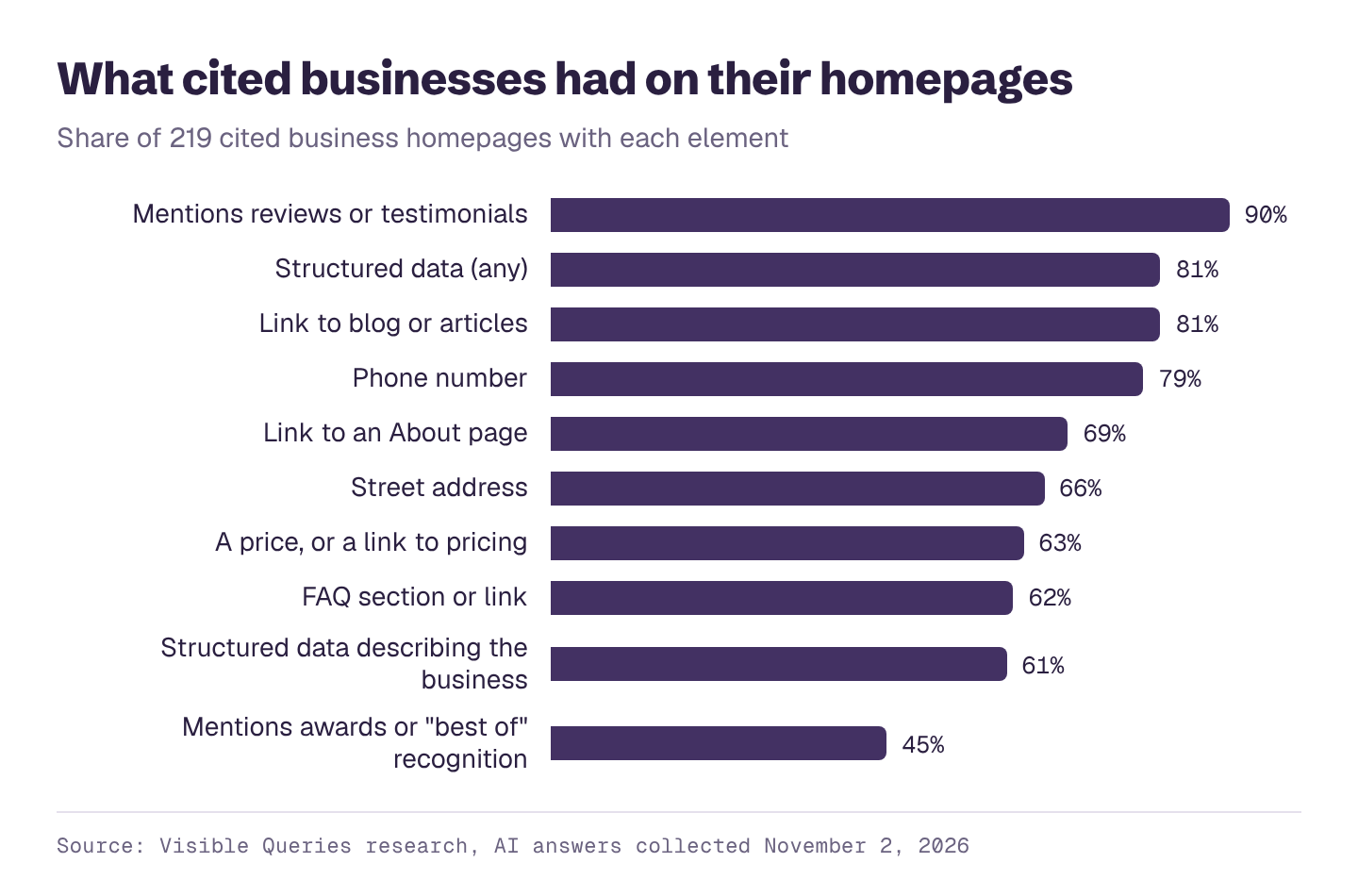
None of the above helps if an assistant can't read the page.
- Important content is in the page's text, not only in images, videos, sliders or PDFs.
- Pages load without needing a login, a cookie wall or a pop-up to be dismissed first.
- Your site doesn't block reputable AI crawlers in its robots.txt file unless you've decided to. Ask your web developer to check.
- Your site has structured data (schema markup) describing your business: name, address, phone, hours, services, and reviews where they apply. Most website platforms and developers can add this.
- Your pages work on a phone and load quickly.
- Old pages that no longer apply are updated, redirected or removed.
How to use this checklist
Don't try to do all of it in a week. Start with the items that are closest to a buying decision and easiest to fix:
- Facts first. Fix hours, locations, contact details and anything that's wrong (sections 4 and 6). Wrong facts actively cost you customers.
- Then clarity. Make your homepage and service pages say plainly what you do, for whom, and what it costs (sections 1, 2, 3 and 5).
- Then proof and depth. Build out reviews, case studies, expert content and answers to buyer questions (sections 7, 8 and 9).
- Check the technical basics with whoever runs your site (section 10).
Then ask the assistants your buyers use the questions your buyers ask, and see what changed. Our guide on how to check your AI visibility yourself walks through how to do that properly, and if an assistant is getting something wrong, here's how to fix it.
Your website won't decide every AI answer on its own. Assistants also read reviews, directories, articles and forums, and a strong site can't make up for being absent from all of them. But your website is the one source you fully control, and it's the one place where you get to say, in your own words, exactly who you are.
See how AI describes your business today
Enter your website and get a free AI visibility report. It takes a few minutes, and you'll see:
- Your AI visibility score, overall and for each AI platform
- Who AI recommends instead of you, and how often
- What AI gets wrong about you, and what to fix first
- Which topics you win and lose, and how often each one is searched
- A downloadable PDF you can share with your team